
-
AuthorPosts
-
May 6, 2023 at 11:26 am #5505
I’d like you to help me figure out this issue and tell me how to fix it:
I have a page URL: https://www.mpslakers.com/rowing-3. The page should be named https://www.mpslakers.com/rowing but it forces it to be called https://www.mpslakers.com/rowing-3. When I tried to force this initially, it loaded an image under /uploads/2014/10/ so I removed the image. I can’t seem to figure out how to work my way backwards to figure out how to get this page renamed to /rowing. I’ve been through every page and menu item throughout WordPress, my FTP structure, SiteGround tools, phpAdmin, etc. and still can’t figure out where any rogue rowing pages might be hiding. I can’t find any plugins that would help, and I don’t really know what to refer to this type of issue so I my attempts to research a solution haven’t worked out very well.
Can you help please? Thank you!
May 6, 2023 at 11:42 am #5506Hi Kristin! The problem is solved 🙂
I searched in your media folder for “rowing” and there was a reference to this image: https://www.mpslakers.com/wp-content/uploads/2014/10/rowing.jpg
Image files, when uploaded to WordPress, create a new post that is like any other post on your website. When the image name “rowing” was created, it also created a post called “rowing”, so it was no longer available from that moment.
I checked all of this through a search in the Media folder; “rowing” was still in there.
Although that image url was stored in the Media area (which is essentially the database), the file was broken for whatever reason. So I deleted the “blank” file, then went to the “rowing” page and changed the url accordingly and it worked.
I’m going through some other parts of the site just to see if there’s anything that could obviously be improved.
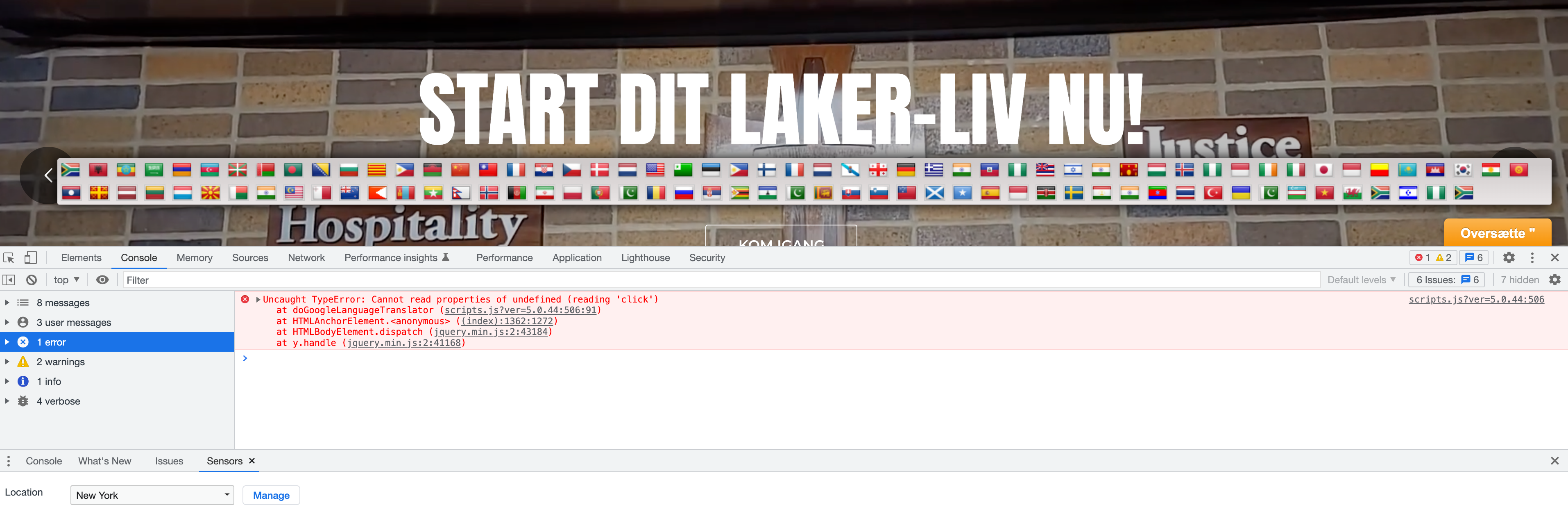
May 6, 2023 at 12:23 pm #5509Hi Kristin, I’ll try and fix this issue that I see from the translation plugin; I’m unable to return to English.
 May 6, 2023 at 1:00 pm #5510
Ok Kristin – all finished! Google changed some of the HTML that is output from their widget. So the code I used to trigger going back to English was no longer valid. I adjusted that code to work again, based on their new way of doing things. If you uninstall the plugin, this may go away, so just be aware of that.
Also, I disabled Gtranslate but I’m not sure if you wanted that active or not. I thought it might cause conflicts. Turn it back on if needed, though!
That’s it! I hope you feel this is resolved. Let me know if you have questions!
May 6, 2023 at 5:55 pm #5514This is a notification test. Kristin, hopefully you recieve this, just reply back here if so, I’ll be notified via email.
May 6, 2023 at 9:15 pm #5515Great! Thanks for all of your help, Rob! I’ll contact you again if I need additional support!
-
AuthorPosts


- You must be logged in to reply to this topic.